Overseeing projects and datasets
The overview, access levels, and deleting empty recordsets.
How-to
Every record on the platform belongs to one project and may be listed in any number of datasets. Ordinary users see only the recordsets they are members of. As an administrator you can see all of them from the Projects and Datasets pages under Platform Management, open any of them, change who has access, and delete the ones that are empty. Use these pages when a manager has left, when access must be corrected, or when abandoned recordsets need clearing away.
The overview lists
Each page lists every recordset of that kind, newest activity first, with its code, title, status, the number of records, how many of them have sequences, the number of sequences, a progress bar and the date it was last opened. The status filter opens on Created; switch it to In Progress, Completed, Remote or all. Search filters the list, and selected rows can be exported as JSON Lines with the JSONL button.
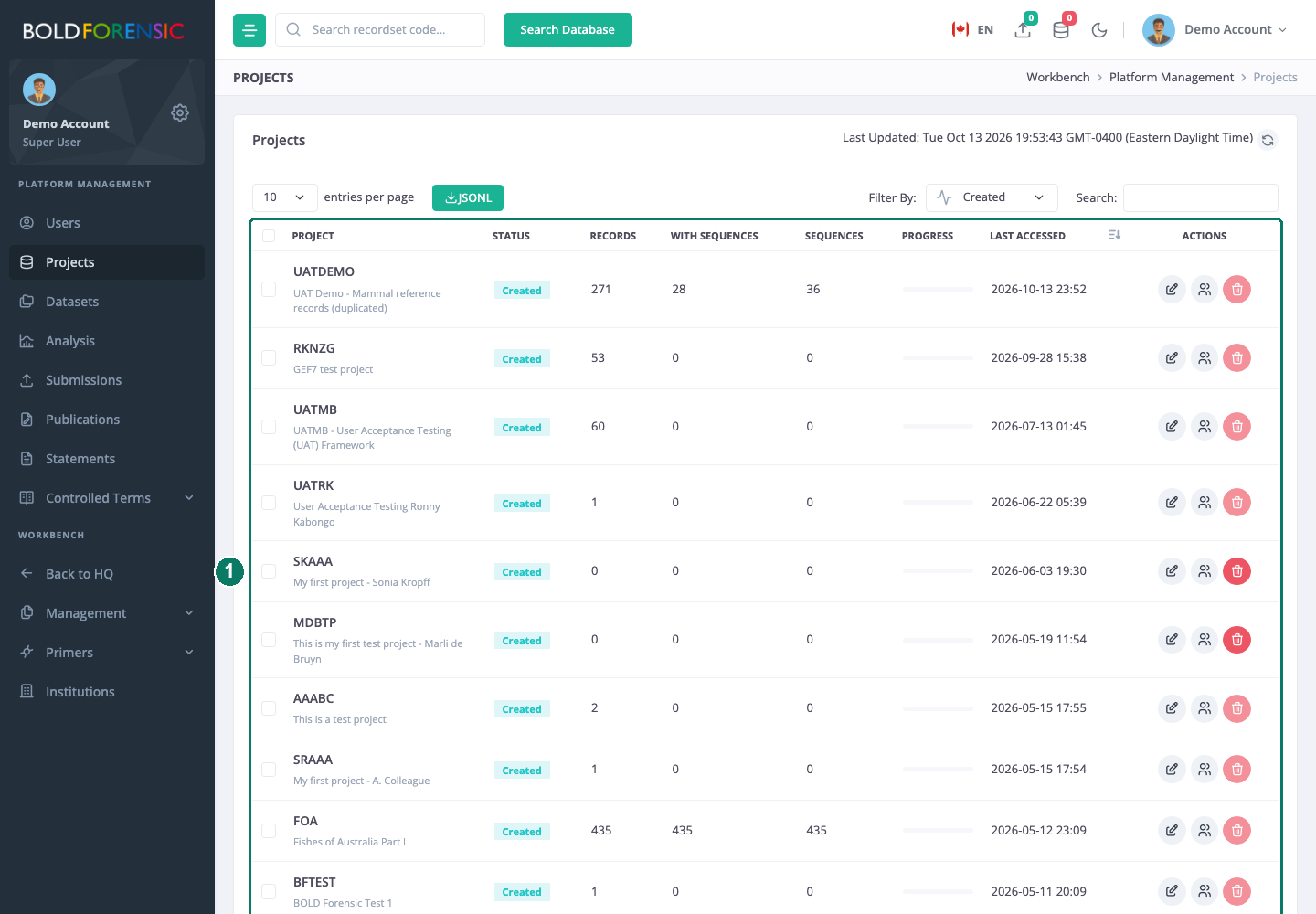
- Projects table with status, counts, last access and the edit, people and delete icons on each row
Three icons on each row lead to the actions below: edit, people and delete.
Open any recordset
Your own HQ lists only the recordsets you belong to. To open one you are not a member of, type its code into the Search recordset code… box in the top bar and press Enter. Administrators can open any project or dataset this way without being added as a member. Codes beginning DS- are treated as datasets.
Change who has access
The people icon opens the same User Permissions dialog that managers use from the console, described in Sharing a project or dataset, with one difference: saving it from Platform Management asks for the 6-digit code from your authenticator app.
- Open the dialog from the recordset's row.
- Add a person by typing at least three characters of their name and choosing them from the suggestions. They are added at
Read Specimens Only. - Change anyone's level with the drop-down on their row, or remove them with the bin button.
- Enter your authenticator code and choose Save changes.
Project levels are Project Manager, Edit All, Edit Specimens/Read Sequences, Read Specimens/Edit Sequences, Read All and Read Specimens Only; dataset levels are Dataset Manager, Read All and Read Specimens Only. What each allows is in Access levels at a glance. The usual case for an administrator is giving a recordset a new manager when the previous one has left.
Limit: The dialog needs at least one existing member to load, and it will not save a list with no members. A recordset nobody belongs to cannot be given members here.
Adding someone or changing their level applies when you save. Removing someone can take up to about a day to take effect, for the reason given on the sharing page.
Edit a title or description
The edit icon opens the same properties dialog as the console. It saves only if you are a manager of that recordset; for a recordset you do not manage, add yourself as Project Manager or Dataset Manager first.
Delete an empty recordset
A recordset can be deleted only when it holds no records. Deleting a project removes its member list and its marker links along with the project itself; deleting a dataset removes its member list and the dataset. Nothing else is touched.
- Choose the delete icon on the row.
- Confirm in the dialog, which names the code and title.
On the Projects page the delete icon is disabled while the project has records, with the note that records must be moved from the project before deletion. On the Datasets page the icon is always shown, but the server refuses to delete a dataset that still has records.
The rule exists because a project is where records live: deleting a project with records would orphan them, and a dataset's record list is part of what it is. To empty a recordset, a Project Manager moves the records to another project and a Dataset Manager removes them from the dataset, as described in Moving records between projects and datasets. Records are never deleted by either action.
Good to know
- The Datasets delete dialog says it will remove the dataset's record associations. It will not; a dataset with records is refused. Empty the dataset first.
- The counts in the overview come from a statistics table that is refreshed periodically, so a record moved a moment ago may not show yet.
- A recordset with status
remoteis readable by every account through search regardless of its member list. Changing its members does not change that. See Projects and datasets explained. - Deleting a recordset is permanent. There is no undo and no archive; if in doubt, leave it and remove its members instead.