What a record holds
Specimen, collection, taxonomy, sequence and forensic fields, attached files, and how to read a record.
ReferenceScreenshots
A record is the platform's account of one specimen: who collected it, where and when, what it was identified as, the DNA sequences obtained from it, its forensic context, and the files that back all of this up. This page explains how its fields are grouped, how to read a record in the workbench, and what the two identifiers you will see everywhere mean.
Process ID and Sample ID
Every record has a processid, a unique identifier generated by the platform when the record is created. It is the key that links everything: sequences, images, documents and chromatograms are all attached to a record by its process ID, and it is what analyses, downloads and statements refer to.
The sampleid is your own identifier for the specimen, typically the field, exhibit or museum catalogue number it was registered under. It is how you find a specimen in a batch spreadsheet or the records table, but it is not guaranteed to be unique across the platform. When in doubt, use the process ID.
The field groups
Fields follow the platform's data model, an extension of the BCDM standard used by the BOLD reference database. They are grouped as follows; the full list with definitions is in the field dictionary.
| Group | What it holds |
|---|---|
| Specimen | Identifiers (processid, sampleid, fieldid, museumid), the institution holding the specimen, and how the sample was obtained and stored |
| Collection | The collection event: collectors, date, country or ocean, province or state, locality, coordinates, habitat and sampling method |
| Taxonomy | The identification from kingdom to species, who made it, how, and any identification notes |
| Sequence | One set per marker: the marker code, the nucleotide sequence and its base count, primers, and the sequencing run details |
| Record organization | The project and datasets the record belongs to |
| Forensic extension | Case context: exhibit and case references, chain of custody and evidential status; an advanced set covers less common fields |
| Individualization extension | Fields for individual-level genotyping of the specimen |
| Feature rollup | Derived indicators maintained by the platform: counts of images, chromatograms, documents, lab notebooks, supporting reads and genetic fingerprints, whether coordinates and country are present, a stop-codon flag and the imported compliance tier |
A record has one specimen, one collection event and one taxonomy, but can have a sequence for each marker sequenced. The feature rollup is not entered by anyone; it is computed from the record and its files and drives the icons and coverage figures on the console.
Reading a record
Records open in the Records modal on the recordset console. Clicking a Process ID in the records table opens the record's genomics tab; clicking a Sample ID opens its specimen tab. The View buttons do the same for every selected row. Open records stack in a list at the side of the modal, each closable on its own; Clear All Records closes them all.
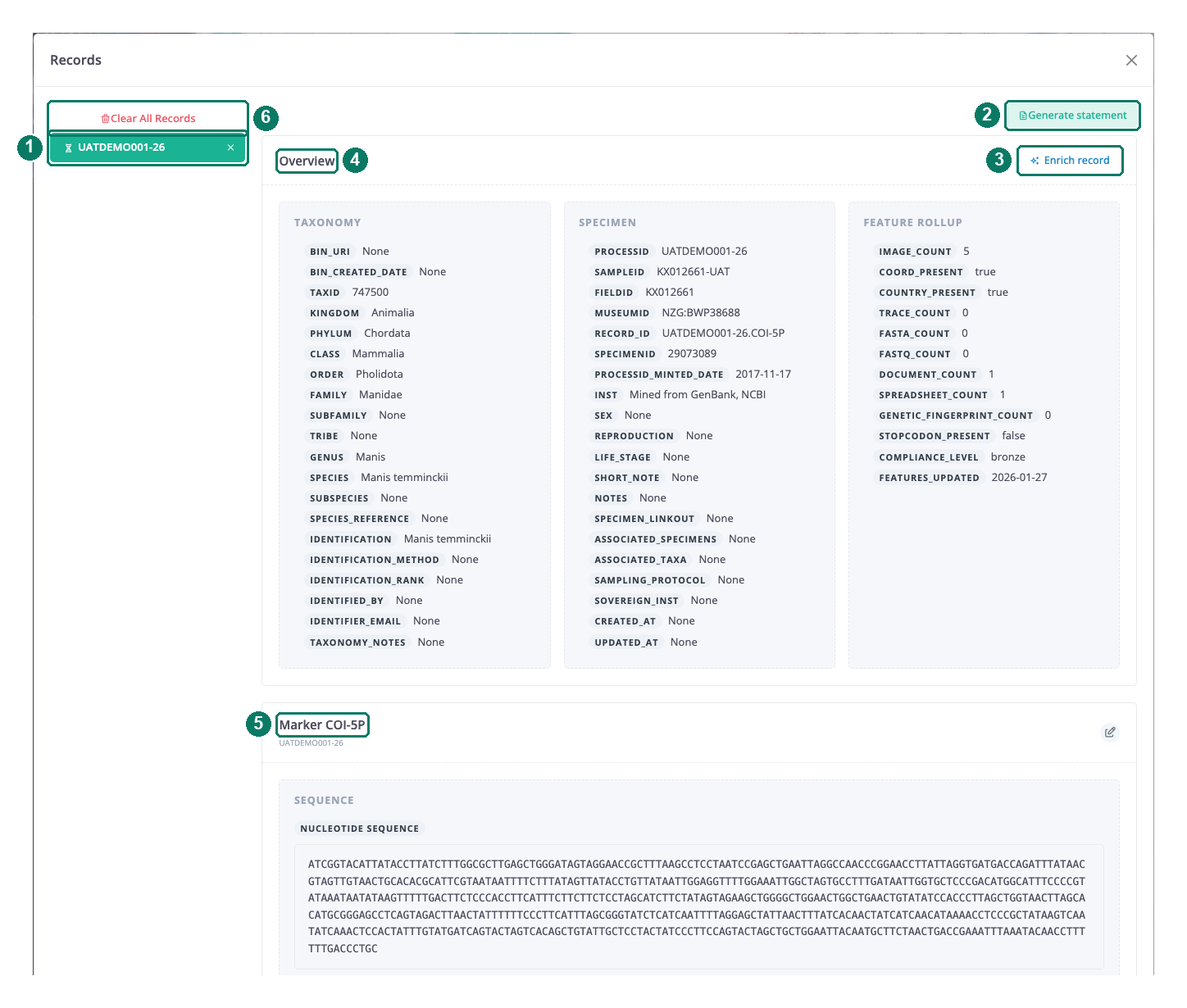
- Open records; each tab is one record
- Generate statement
- Enrich record
- Overview panels
- Marker card with the sequence
- Clear All Records
Specimen tab
The Overview card shows the specimen, collection, taxonomy and forensic fields in panels, one per group. Visuals holds a carousel of the specimen's images and a map pin at its coordinates (or a note that there are none). Verbatim is a collapsible list of every field with its stored value, including fields not shown in the overview. Documents lists attached PDFs with a thumbnail, metadata and a download link.
If your access level allows editing, an Edit record button opens the single-specimen form pre-filled with this record; see Adding or editing one specimen.
Genomics tab
The top panels repeat the taxonomy, specimen and feature-rollup fields. Then there is one Marker card per marker, showing the nucleotide sequence and the sequence fields, with icons to edit the sequence or add one. Under each marker, the Traces and FASTQ sections show the chromatograms and supporting reads for that marker. Further down, Spreadsheets lists attached lab notebooks and Genotype Data lists genetic-fingerprint files, each with a preview, metadata and a download link. The viewers are described in Maps, images, alignments and traces.
The toolbar above a record has Generate statement, which starts an expert statement from this record (see Generating a statement), and Enrich record, which attaches a single file (see Attaching a file to one record).
Attached files
Files are stored separately from the record, in the platform's file store, and are linked to it by process ID. The kinds you will meet are specimen images, specimen documentation (PDF), chromatograms, supporting reads (FASTQ), genetic fingerprints and lab notebooks. Every preview and download goes through a link tied to your session and that one file. What each type is for and how it is checked is covered in Evidence files.
Good to know
- The compliance tier in the feature rollup is imported with the record. The platform does not calculate it.
- Chromatogram and supporting-read panels depend on an external lookup and are empty if it cannot be reached; the files are still stored.
- Edit record does not work when the record is opened from a dataset console; use the project console.