Uploading sequences
From a FASTA file or pasted text, and the checks a sequence passes before it is loaded.
How-toScreenshots
Sequences are added to existing specimen records from a FASTA file or pasted FASTA text. Each sequence is linked to its specimen by an identifier in the FASTA header, checked by an ingest job and then loaded against the record for the marker you chose. Use this once your specimens are in the project; a sequence cannot create a record on its own.
How it works
Open Data Upload > Sequences in a project's side menu. The Upload Sequences modal asks for:
| Field | What to enter |
|---|---|
| Project Code | Filled in from the project you are in |
| Marker | The marker (for example COI-5P) that every sequence in this upload belongs to; one marker per upload |
| ID Type | Sample ID or Process ID: how the first field of each FASTA header is read |
| FASTA File | A single file: .fa, .fas, .fasta or .txt |
Switch on Paste FASTA instead of attaching a file to paste the sequences into a text box instead.
Each FASTA header is split on |, and the first part is taken as the identifier. With >SAMPLE-001|extra text, the sequence is linked to the specimen whose Sample ID (or Process ID, depending on your choice) is SAMPLE-001. Anything after the first | is ignored for matching.
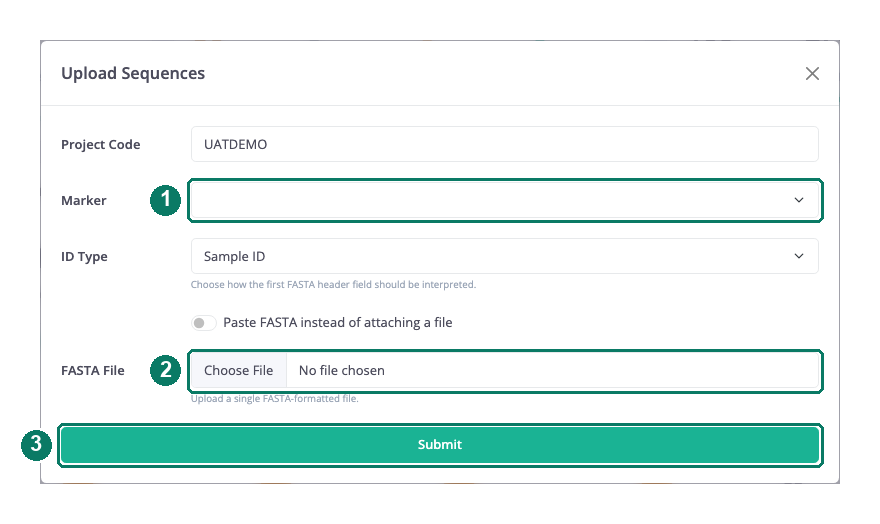
- Marker for every sequence in this upload
- FASTA file (or paste the text instead)
- Submit
Upload sequences
- Prepare one FASTA file (or text) per marker. The identifier in each header must match a specimen already in the project.
- Open Data Upload > Sequences, choose the marker and the ID type.
- Attach the file or paste the text, and submit.
- Follow the submission in the uploads drawer. The load needs project specimen access of at least 7.
What is checked
The checks happen in two places.
At intake, when the processor picks up your submission (within about a minute), the FASTA is parsed. Text that is not FASTA, or a header with no sequence under it, rejects the whole submission with an error you can read in the drawer. Each sequence is then matched to its record and enriched with that record's taxonomy, so the ingest job knows what organism it is looking at.
In the ingest job (sequence-data-ingest), every record must have a marker code and a nucleotide sequence. The job produces a stop-codon report for protein-coding markers, using the marker's translation table and the record's taxonomy, and that report is merged into the load so it is stored with the sequence. The prepared records are then upserted into the record store.
The job runs on the analysis service's own schedule, so expect the whole route to take minutes rather than seconds. The processor polls the job on each pass and loads the result when the job completes.
Track the result
The uploads drawer in the top bar lists the submission with a status of queued, processing, success or failed. A failed submission has a View error pill that names the stage (intake, analysis or database load) and the message. See Tracking your uploads.
Once loaded, the sequence appears on the record's marker card, and the project's sequence counts on the recordset console update.
Good to know
Good to know: One upload, one marker. If you have sequences for several markers, make one upload per marker.
Good to know: A single bad record in the FASTA (an empty sequence, or text before the first header) rejects the whole submission at intake. Fix the file and upload it again; nothing from the first attempt is loaded.
Good to know: The identifier must already exist. An unmatched header does not create a record; register the specimen first with a batch upload or the specimen form.