Uploading an evidence package
The package layout, the metadata file, and uploading large files.
How-toVideo walkthrough
An evidence package is a .tar or .zip archive holding a set of files of one kind, plus a metadata.tsv that lists each file and names the record it belongs to. It is the way to attach many files at once: a day's specimen photographs, a run of chromatograms, a folder of permits. Packages are queued and processed in the background; for one file on one record, Attaching a file to one record is quicker.
Package types
Open the Upload modal from a project's side menu under File Upload, where the type is pre-set, or from the Upload button at the top of the uploads drawer, where you choose it.
| Side menu | Modal type | File column in metadata.tsv |
Identifier |
|---|---|---|---|
| Specimen Images | Image | Image File |
Process ID and/or Sample ID |
| Chromatograms | Trace | Trace File |
Process ID and/or Sample ID |
| Specimen Documentation | Document | Document File |
Process ID (required) |
| Genetic Fingerprints | Genotype Data | Microsatellite File |
Process ID (required) |
| Lab Notebooks | Spreadsheet | Spreadsheet File |
Process ID (required) |
For Image, Trace, Document and Spreadsheet, the modal offers a starter package as ZIP or TAR: a folder with an example file and a filled-in metadata.tsv whose header row is exactly what the processor expects. Download it, replace the example with your files, edit the metadata and upload. There is no starter package for Genotype Data; build the metadata file from the columns below.
Package layout
- One archive,
.taror.zip. - Your files, in any folder structure.
- One metadata file, named
metadata.tsv,metadata.csvormetadata.xlsx, anywhere in the archive. The processor searches the whole tree for it. - The file column holds each file's name as it appears in the archive. Keep file names unique.
The metadata columns
The first column names the file; the rest describe it. Column headings are matched exactly, so copy them from the starter package.
| Package | Columns |
|---|---|
| Image | Image File, Process ID, Sample ID, Caption, Photographer, View Metadata, Measurement, Measurement Type, License Holder, License, License Year, License Holder Institution, License Contact, Isolate, Catalog Number, Instrument, Camera |
| Trace | Trace File, Process ID, Sample ID, Marker, Forward PCR Primer, Reverse PCR Primer, Sequencing Primer, Read Direction, Sequencing Run Date, Source Laboratory, Source Laboratory ID |
| Document | Document File, Process ID, Sample ID, Title, Document Type, Document ID, Document Version, Annotation |
| Genotype Data | Microsatellite File, Process ID, Sample ID, Sample Type, Panel Name, Panel Version, Locus, Dye Set, Instrument Model, Run Date, Size Standard, Well Position, Plate ID |
| Spreadsheet | Spreadsheet File, Process ID, Sample ID, Template Name, Template Version, Data Content |
Document Type picks the document category: one of specimen_documentation, chain_of_custody, collection_statement, permit, taxonomic_identification, lab_worksheet or scientific_paper. Leave it blank for specimen_documentation. See Evidence files for what the categories mean.
A chromatogram can belong to more than one specimen: rows that name the same Trace File with different identifiers are stored as one object linked to each of them.
Upload a package
- Open the modal for the file type.
- Attach the
.taror.zip. - Submit and leave the modal open until the progress bar reports done.
Packages are sent in 80 MB pieces, each retried up to three times, with a progress bar showing the transfer. The pieces are reassembled on the server, size-checked and queued as one submission. Cutting the archive up keeps every request well under the size that the platform's edge network will accept, so a multi-gigabyte package of images uploads reliably where a single request would be refused.
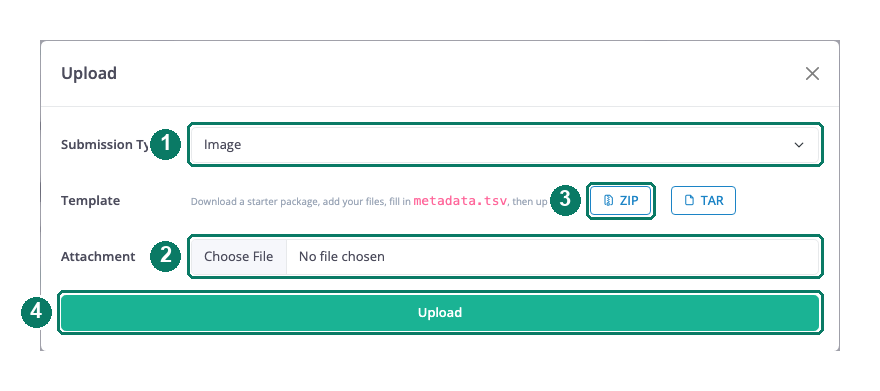
- Submission type
- The archive to upload
- Starter package as ZIP or TAR
- Upload
What happens afterwards
The submission appears in the uploads drawer as queued. The processor runs once a minute and takes one package of each type per pass, so several packages of the same type drain one per minute. For each package it unpacks the archive, reads the metadata file and sends the files to BioStor: images and chromatograms one at a time, documents, fingerprints and notebooks as a batch. When all files are stored, the records' evidence counts are refreshed, an activity-log entry is written and the submission is marked success. See Tracking your uploads.
Good to know
Good to know: The modal also lists Specimen and Sequence as types. They do not work with an archive; use Data Upload for specimens and sequences.
Good to know: An image or chromatogram package that fails part-way has already stored the files before the failure. Check the records before uploading the package again.
Good to know: If the package cannot be read when the processor first reaches it, image and chromatogram submissions are returned to
queuedand retried up to five times. Other types fail on the first attempt.Good to know: Nothing checks that you may write to the records named in the metadata. Make sure every Process ID is the one you intend.