Searching records
Search by taxonomy, place, marker or date, or with a list of identifiers, and what happens to results.
How-toVideo walkthrough
Projects and datasets hold records, but the record you need is not always in a set you can think of. Searching records lets you pull records together across every project and dataset you can read, either by describing them (a taxon, a place, a marker, a collection period) or by listing their identifiers. The result is a temporary record set with the same tools as a recordset: a console, analyses, visualisations and downloads. Use it when you want to analyse or export records that do not sit together in one project.
How it works
The Search Database button in the top bar opens the Search Records dialog. It has two tabs, Search by Terms and Search by IDs, and both end the same way: the workbench asks the record store for every matching record, keeps only those your account is allowed to read, and opens a results page.
Searches match against the search index, not against the text of each record. A term you type must be exactly the name held in the index: Canis mesomelas finds records identified to that species, Canis finds the genus, but a misspelling or a partial name is reported as not found. There is no autocomplete and no fuzzy matching, and the search does not look inside free-text fields such as notes.
Access is applied at search time. You see only records in projects and datasets you belong to, plus public records if you asked for them. Two people running the same search can therefore get different results.
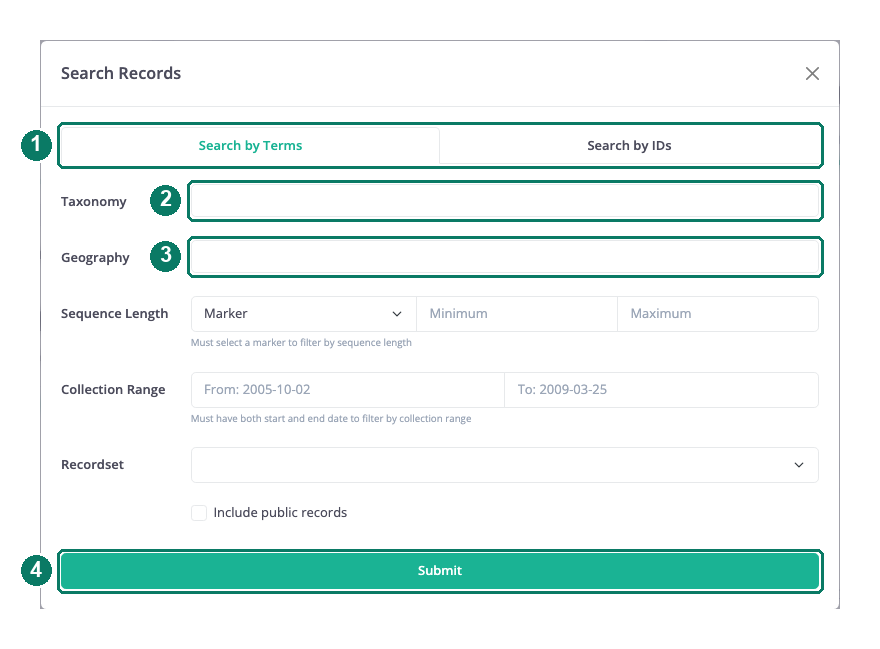
- Search by Terms and Search by IDs tabs
- Taxonomy tags
- Geography tags
- Submit
Search by terms
Fill in any combination of the fields on the Search by Terms tab and choose Submit. Every field you leave empty is ignored, and the fields you fill are combined: a record must satisfy all of them.
| Field | What it matches | Notes |
|---|---|---|
| Taxonomy | Names at any rank from phylum to species | Type a name and press Enter to add it as a tag; several tags match any of them |
| Geography | Country, province or state, ecoregion, biome or realm names | Same tag behaviour as Taxonomy |
| Sequence Length | Records with a sequence for one marker, within a length range | Pick the marker first; Minimum and Maximum are in base pairs and only apply when a marker is chosen |
| Collection Range | Records collected between two dates | Both From and To are needed; one date on its own is ignored |
| Recordset | Restricts the search to one of your projects or datasets | Leave blank to search everything you can read |
| Include public records | Adds records marked public on the platform | Off by default |
Search with a list of identifiers
When you already have the identifiers, for example from a laboratory worksheet or a report, use the Search by IDs tab. Choose Process ID or Sample ID from the selector, paste one identifier per line into the box and choose Submit. A single search uses one identifier type; if you have both kinds, run two searches. Identifiers that match nothing you can read are simply absent from the result.
What a result is
A successful search redirects you to a page titled Search Result followed by the search's code. At the top is a summary of the criteria you used, for example TAX: Canis or COLLECTION_DATE: [2019-01-01:2019-12-31], followed by statistics for the matching records and the same record table you would see on a recordset. The sidebar offers Data Analysis, Data Visualization and Data Download for the result, so you can run an identification or build a tree on the matching records, map them or export them exactly as you would from a project. See The recordset console, Running an analysis and Downloading records, sequences and files.
A result is not a dataset. It is not listed on HQ, nobody else can be added to it, and it is held only for a short time. If you want to keep a set of records together, create a dataset and add the records to it (see Projects and datasets explained).
How long results last
A result page is kept for one hour from the moment the search ran. After that its address returns "Search not found" and you need to run the search again. Analyses you submitted from the result, and files you downloaded, are not affected by the result expiring.
The result's address is not tied to your account. If you pass the link to a colleague within the hour, they can open it, but they see only the records they themselves are allowed to read, so their statistics and table may differ from yours.
Good to know: A term containing
&breaks the search; leave that character out of taxonomy and geography tags. A very broad search that the record store cannot complete within 120 seconds is abandoned; narrow it with a recordset, a marker or a date range and try again. Wait for the redirect rather than submitting twice, because each submission starts a new search.